
I thought my blog's SEO was fine.
I had a sitemap. A robots.txt. Structured data. OpenGraph tags. All the boxes checked, all the right buzzwords in place. I felt responsible.
Then I opened Google Search Console. And I felt considerably less responsible.
Pages weren't being indexed. Duplicate URLs were multiplying like rabbits. My sitemap — the one file whose entire job is to help Google find my content — showed "Couldn't fetch." For weeks. Despite being perfectly accessible from every browser and every terminal I tried.
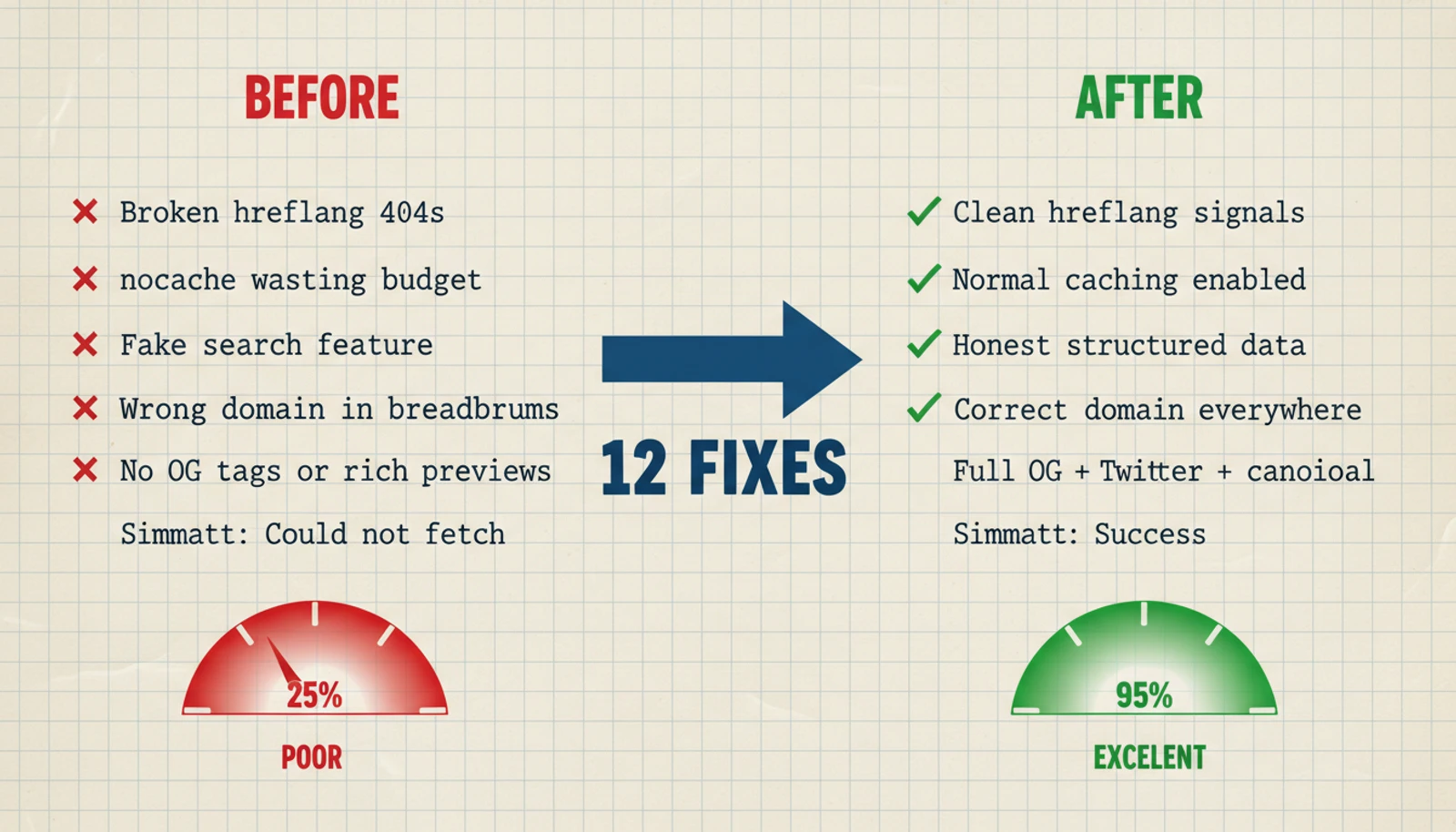
What followed was an afternoon-long audit that turned up 12 issues. Not obscure edge cases. Not esoteric protocol violations. Just... mistakes. A hardcoded URL from a domain I don't even use. Language routes that don't exist. A search feature I never built but proudly advertised to Google. The kind of things that make you close your laptop, stare at the ceiling, and whisper "how long has this been like this?"
If you're running a Next.js blog, especially on Vercel, I'm betting you have at least three of these. Let me save you the ceiling-staring.
Wait — What Even Is SEO?
If you already know, skip this section. If the term makes your eyes glaze over, stay.
SEO (Search Engine Optimization) is the practice of making your website understandable to Google. That's really it. You're not trying to trick anyone. You're trying to not confuse the largest librarian in human history.
Google sends robots (called crawlers) to visit your site, read your pages, and figure out what they're about. Your job is to make their job easy: give them clear signals about your content, don't send them to dead ends, and don't lie to them.
The rest of this post is about all the ways I was accidentally making their job harder.
The Jargon Decoder Ring
These terms show up repeatedly. I'll explain each one with an analogy that hopefully makes it stick forever.
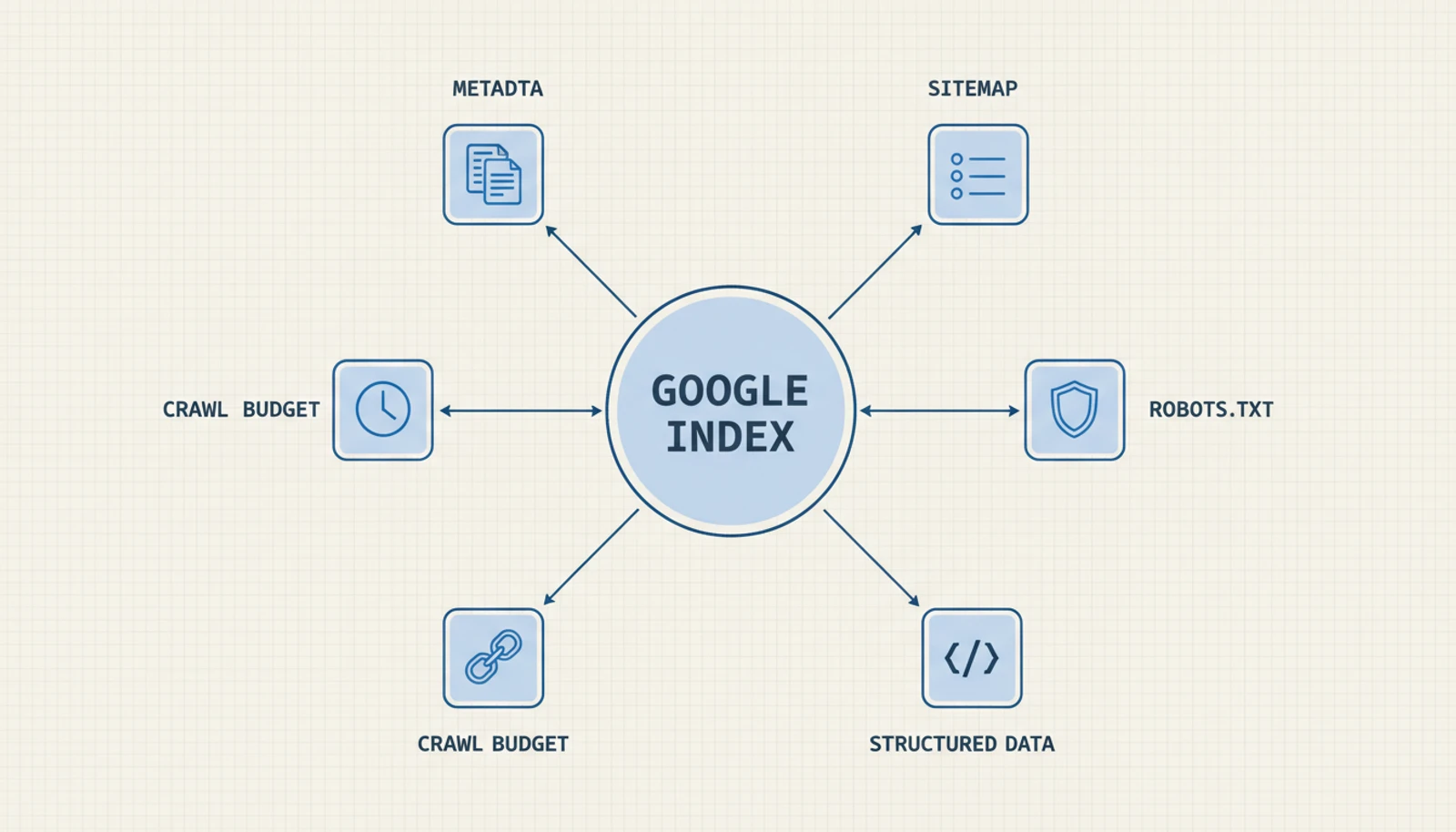
Google Search Console — A free dashboard that shows you how Google sees your site. It's like having a candid friend who says "your shirt is on backwards" while everyone else just smiles politely. It reveals problems you'd never notice on your own. If you have a website and haven't set this up, stop reading and go do it. It's free. I'll wait.
Metadata — Invisible labels on your page that Google and social media platforms read. Think of it as the back cover of a book: the title, author, description, and genre. Visitors don't see it, but it determines how your page appears in search results and link previews.
Canonical URL — A tag that says "this is the one true version of this page." When the same content appears at multiple URLs (common in web frameworks), canonical tells Google which one to index. Without it, Google might split your ranking power across several copies — like getting three half-filled glasses instead of one full one.
OpenGraph (OG) tags — Metadata that controls how your page looks when shared on social media. Without OG tags, Twitter and LinkedIn will try to guess what to show. They will guess wrong. You've seen those sad link previews — no image, truncated title, generic description. That's the absence of OG tags.
Structured data (JSON-LD) — A block of code that describes your content in a way Google can directly read. "This is a blog post. The author is Forest Deng. It was published on February 5, 2026." Google uses this for rich results — those search listings with author names, dates, star ratings, and breadcrumb trails that look so much better than plain blue links.
Sitemap — An XML file listing all your pages with their last-updated dates. A table of contents for Google. "Here are all my pages, and here's when each one last changed." Google uses it to decide what to crawl and when.
robots.txt — A text file that tells Google which areas of your site are off-limits. The "Staff Only" sign on the back door.
Crawl budget — Google only visits a limited number of your pages per session. If it wastes visits on broken pages or duplicates, your actual content gets less attention. It's like having 30 minutes in a bookshop — you don't want to spend 20 of those minutes in the wrong aisle.
hreflang — A tag connecting different language versions of the same page. "The English version is at /en/about, the Chinese version is at /zh/about." Google shows the right one based on the user's language.
Now, the fun part.
The Critical Fixes
These were the issues doing actual damage — actively confusing Google or wasting its limited attention.
Sin #1: Lying About Language Versions
What I found: My metadata declared language-specific URLs:
alternates: {
  languages: {
    'en': `${WEBSITE_HOST_URL}/en`,       // ← doesn't exist
    'zh-CN': `${WEBSITE_HOST_URL}/zh-CN`, // ← also doesn't exist
  }
}
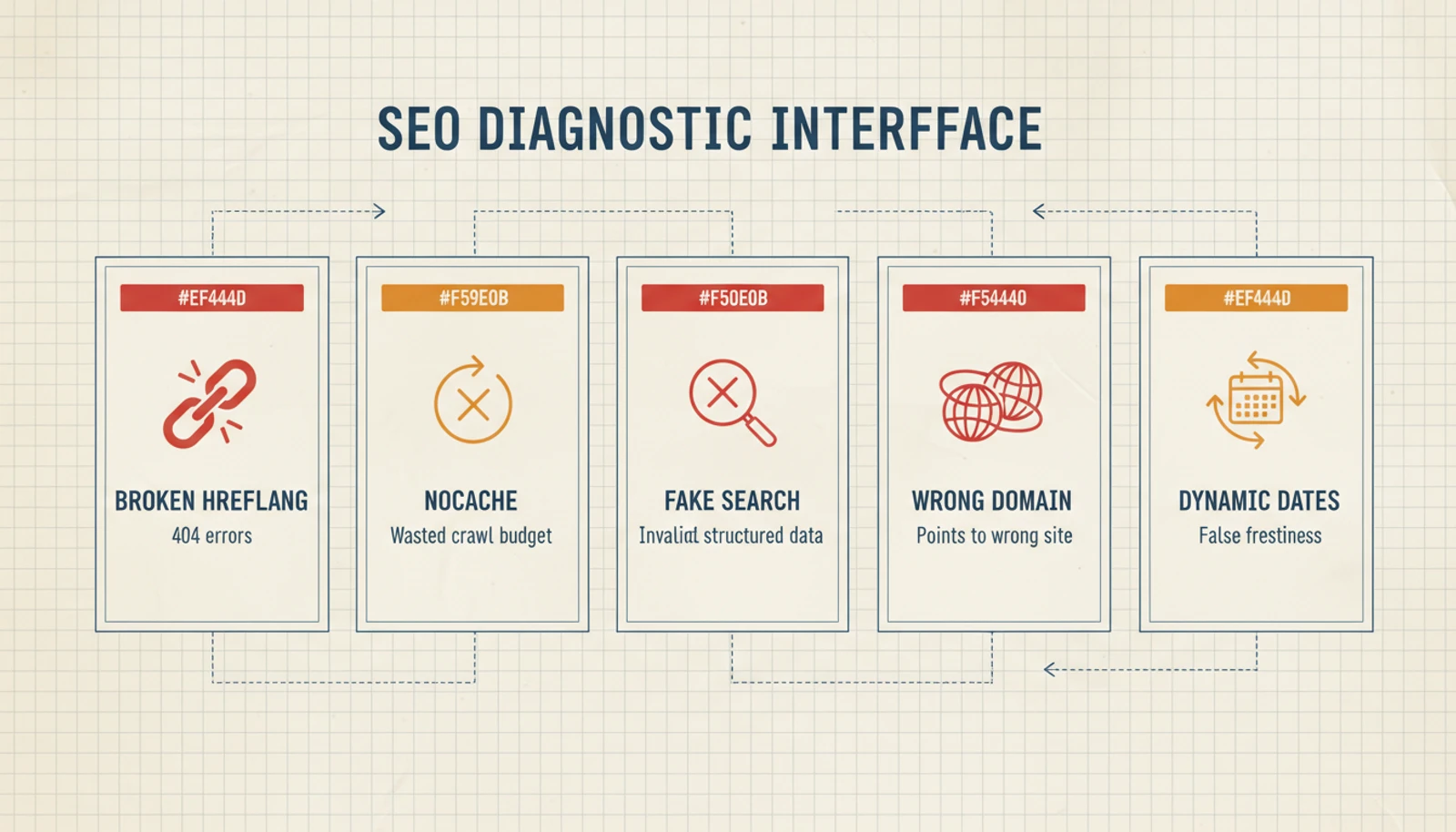
In plain English: I was telling Google "I have an English version at /en and a Chinese version at /zh-CN!" Google, being a diligent librarian, went to check. Found nothing. Got a 404. Made a note: "This site gives bad directions."
My blog does have English and Chinese articles — but they all live at the same URLs. There are no separate language paths.
Why it's bad: It's the boy who cried wolf. After enough wrong directions, Google stops trusting your language signals entirely. Future hreflang declarations? Ignored.
The fix: Delete the languages block. Golden rule: never advertise what you don't have.
Sin #2: Telling Google "Don't Remember Me"
What I found:
robots: {
  index: true,     // "Put me in search results"
  follow: true,    // "Follow my links"
  nocache: true,   // "But forget everything after!" ← why??
}
In plain English: Imagine meeting someone at a party and saying "Great conversation! By the way, please forget everything we just talked about and ask me the same questions next time." That's what nocache does. Every visit, Google must re-download the entire page from scratch.
For a blog that updates maybe once a week, this is absurd. You're wasting Google's time and your crawl budget.
The fix: Remove nocache: true. One line deleted. Let Google remember your pages like a normal website.
Sin #3: Advertising a Feature That Doesn't Exist
What I found: My structured data included:
{
  '@type': 'SearchAction',
  target: `${WEBSITE_HOST_URL}/search?q={search_term_string}`,
  'query-input': 'required name=search_term_string'
}
In plain English: I was telling Google "my site has a search box! Type anything!" Cool. Except my blog has no search page. No search functionality at all. This was template code I'd copied at the beginning and never cleaned up.
Why it's bad: Structured data is a contract with Google. Break one clause, and Google side-eyes the rest. Your valid article dates, your real author info, your actual breadcrumbs — all slightly less trusted because of a fake search box.
The fix: Delete the SearchAction. Only promise what you deliver.
Sin #4: The Domain That Wasn't Mine
What I found:
// My blog lives at blog.swifttools.eu
// My breadcrumb structured data said:
...(item.href && { item: `https://forestdeng.com${item.href}` }),
In plain English: My breadcrumb trails — those "Home > Dev > My Article" navigation paths — were pointing to forestdeng.com. My blog is at blog.swifttools.eu. Every breadcrumb link in my structured data led to the wrong domain.
This is like putting someone else's address on your business card. Google visits the address, finds a different business (or nothing), and throws away your breadcrumb data.
The fix:
import { WEBSITE_HOST_URL } from '@/lib/constants'
...(item.href && { item: `${WEBSITE_HOST_URL}${item.href}` }),
Thirty seconds to fix. Months to notice. Use constants for URLs. Always.
Sin #5: Every Deploy Was a Time Machine
What I found:
dateModified: new Date().toISOString(),   // "Modified right now!"
datePublished: new Date().toISOString()   // "Published right now too!"
In plain English: Every deployment updated these timestamps to "right now." My three-month-old article? Just modified! My six-month-old about page? Also just modified! Everything on the site was perpetually brand new.
Imagine a newspaper that reprints every article with today's date every morning. Tuesday's edition has the same news as Monday's, but dated Tuesday. Wednesday, same thing. How long before you stop trusting the dates?
Why it's bad: dateModified tells Google which content is fresh and worth re-crawling. When everything is always "fresh," nothing is. Google can't prioritize.
The fix: Removed these dates from the site-level schema entirely. Google doesn't need dateModified on a WebSite schema — it cares about dates on individual articles. Each article's BlogPosting schema already uses the actual publication date. Problem solved.
The High-Priority Fixes
Not actively harmful, but missed opportunities. Like having a great restaurant with no sign on the door.
Sin #6: Posts With No Social Presence
What I found: My post metadata returned only:
return {
  title: post.title,
  description: post.description
  // ...and nothing else. No image. No social tags. No canonical URL.
}
In plain English: When someone shared my blog post on Twitter, it looked like this: a plain text URL. No cover image. No rich preview card. Just... a link. In 2026. Meanwhile my articles had beautiful cover images that were sitting there, unused, wondering what they did wrong.
Also: no canonical URL meant Google had to guess which version of each page was authoritative. Google doesn't like guessing.
The fix: Full metadata treatment:
return {
  title: post.title,
  description: post.description,
  alternates: { canonical: postUrl },         // "This is the real URL"
  openGraph: {                                // "This is how I look on social media"
    type: 'article',
    publishedTime: new Date(post.date).toISOString(),
    images: [{ url: coverImage, width: 1200, height: 630 }],
  },
  twitter: {
    card: 'summary_large_image',              // "Show the big pretty card"
    images: [coverImage],
  },
}
I also added BlogPosting structured data using a generateArticleSchema() function that already existed in my codebase — written, tested, exported, and never called. Dead code, meet your purpose.
Sin #7: Five Pages, One Identity
What I found: My category pages (/categories/dev, /categories/ai, etc.) had no generateMetadata at all.
In plain English: Five different pages, all claiming to be called "Forest Notes" with identical descriptions. Google looked at them and went: "These are all the same page. I'll index... one? Maybe? Whatever."
The fix: Unique metadata per category:
export function generateMetadata({ params }: CategoryPageProps): Metadata {
  const categoryName = getCategoryName(params.category)
  return {
    title: `${categoryName} Articles`,  // "AI & Data Articles"
    description: `Browse all ${categoryName.toLowerCase()} articles.`,
    alternates: { canonical: url },
    openGraph: { title, description, url, type: 'website' },
  }
}
Now /categories/dev is "Development Articles" and /categories/ai is "AI & Data Articles." Distinct pages with distinct identities. Google can finally tell them apart.
Sin #8: The Metadata That Existed But Didn't
What I found: My root layout.tsx imported metadata but never exported it:
import { jsonLd } from '@/lib/metadata'
// The metadata object — with metadataBase, OpenGraph, Twitter, everything —
// was defined, imported, and then... just sitting there. Unexported. Silent.
In plain English: In Next.js, the root layout's metadata is inherited by every page. Most importantly, metadataBase (which tells Next.js your site's domain) needs to be exported here so child pages can resolve image URLs correctly. Without it, Next.js throws a warning and social media images might break.
The fix: One line. One incredibly important line:
import { metadata as siteMetadata, jsonLd } from '@/lib/metadata'
export const metadata = siteMetadata
The Medium-Priority Fixes
Cleanup work. Less dramatic, but these were creating noise in Search Console.
Sin #9: The Phantom Query Parameters
What I found: Google was indexing URLs like:
/posts/my-article?_rsc=abc123
/posts/my-article?_rsc=def456
/posts/my-article?_rsc=ghi789
In plain English: Next.js uses a query parameter called _rsc internally — it's how React Server Components stream data from server to browser. You never see it, but it gets appended to URLs. And Google was treating each variation as a separate page.
One article. Five indexed copies. Same content, different URLs. This is duplicate content, and it dilutes your page's ranking power. Instead of one strong page, you get five weak ones fighting each other.
The fix: Block them in robots.txt:
disallow: ['/*?_rsc=*'],Translation: "Hey Google, if you see _rsc in a URL, it's not a real page. Move along."
Sin #10: The Sitemap's Ghost Page
What I found: My sitemap included /categories — a URL that doesn't exist. Only /categories/dev, /categories/ai, etc. exist.
In plain English: Your sitemap is a menu. If item #7 says "Chef's Special" but the waiter returns with "sorry, we don't have that," you start wondering what else on the menu is fiction.
The fix: Remove the phantom URL. Every URL in your sitemap should return actual content.
Sin #11: The Boy Who Cried "Updated!"
What I found: Homepage and category pages in the sitemap used new Date() as lastModified:
lastModified: new Date() // = "this very second!"In plain English: Same problem as Sin #5, but in the sitemap. Every build = every page freshly modified. Google can't tell which pages actually changed, so it can't prioritize what to re-crawl. It's a to-do list where every item says URGENT.
The fix: Use real dates:
- Homepage → date of the most recent post
- Category pages → date of the most recent post in that category
- Post pages → the actual publication date
Now when Google sees lastModified: 2026-02-05 on the Dev category page, it knows something genuinely changed that day.
The Boss Fight: Google Can't Read My Sitemap
This one deserves its own act. It was the most baffling issue and took the most detective work.
The symptom: Google Search Console showed "Couldn't fetch" for my sitemap. Permanently. Not a hiccup — it had been broken for weeks.
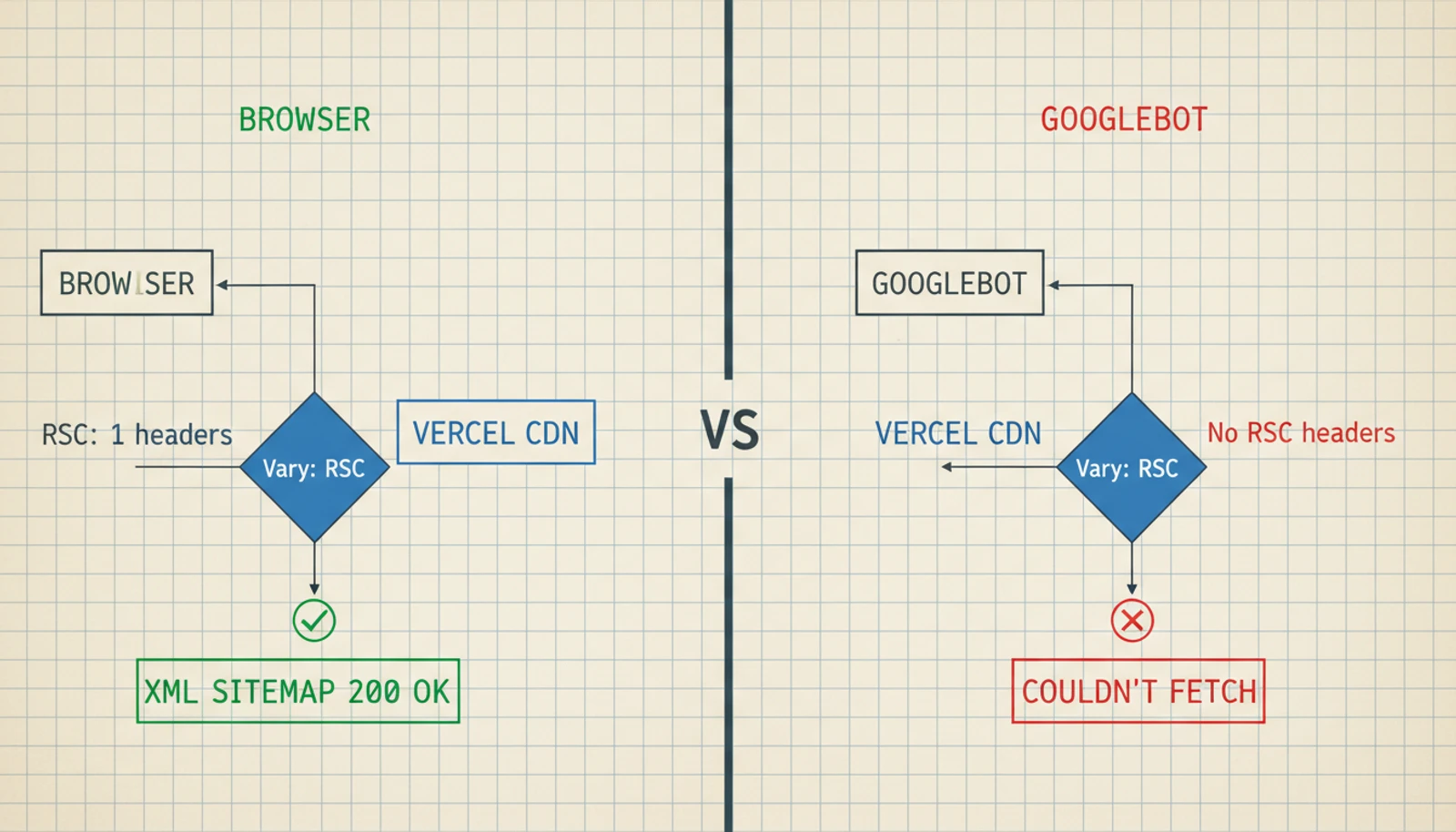
The maddening part: The sitemap worked perfectly everywhere else. curl returned valid XML with HTTP 200. Faking a Googlebot user agent? Also fine. Every online sitemap validator gave it a thumbs up.
So... why couldn't Google read it?
The investigation: I checked the usual suspects. No middleware blocking the path. No duplicate sitemap in the public/ folder. Correct Content-Type header. No redirects. Everything was textbook perfect.
Then I pulled up the full response headers:
Vary: RSC, Next-Router-State-Tree, Next-Router-Prefetch, Next-UrlThere it was. Four header values that have no business being on a sitemap.
What's happening: The Vary header tells Vercel's CDN "hey, serve different cached versions depending on whether the request includes these headers." These headers (RSC, Next-Router-State-Tree, etc.) are internal to Next.js — browsers send them during app navigation, but Googlebot doesn't.
When Googlebot requests the sitemap without these headers, Vercel's CDN can get confused about which cached version to serve. The result: a timeout or garbled response. From Google's side? "Couldn't fetch."
This turned out to be a known issue with Next.js's metadata API. If you generate your sitemap using app/sitemap.ts, the framework adds these Vary headers automatically. No opt-out.
The fix: I converted the sitemap from Next.js's metadata API (app/sitemap.ts) to a plain route handler (app/sitemap.xml/route.ts) — the same approach I already used for my RSS feed:
// app/sitemap.xml/route.ts
export async function GET() {
  const xml = buildSitemapXml() // exact same sitemap logic

  return new Response(xml, {
    headers: {
      'Content-Type': 'application/xml',
      'Cache-Control': 'public, max-age=3600, s-maxage=86400',
    },
    // No Vary: RSC. No nonsense. Just XML.
  })
}
After deploying, I resubmitted the sitemap in Google Search Console — using sitemap.xml/ (with a trailing slash) to bust Google's cached "Couldn't fetch" status. It worked immediately.
The Scoreboard
| # | Sin | What Went Wrong | Redemption |
|---|---|---|---|
| 1 | Fake language versions | hreflang to 404s | Delete alternates.languages |
| 2 | nocache on a blog | Forced full re-downloads | Delete nocache: true |
| 3 | Phantom search feature | Invalid structured data | Delete SearchAction |
| 4 | Wrong domain in breadcrumbs | Breadcrumbs led to another site | Use WEBSITE_HOST_URL constant |
| 5 | Perpetually "fresh" dates | Every deploy = site-wide update | Remove dates from site schema |
| 6 | Posts with no social tags | Ugly link previews, no rich results | Full OG + Twitter + canonical |
| 7 | Clone category pages | Five pages, one identity | Unique metadata per category |
| 8 | Orphaned root metadata | metadataBase never exported | One-line export in layout |
| 9 | _rsc duplicates | Same content at many URLs | Block in robots.txt |
| 10 | Ghost page in sitemap | 404 in Google's index | Remove phantom URL |
| 11 | Fake "last modified" dates | Everything always "urgent" | Use real post dates |
| 12 | Unfetchable sitemap | Vary: RSC headers | Convert to route handler |
What I Actually Learned
Google Search Console is the only mirror that doesn't lie. My code "looked right." The HTML was valid. The structured data passed every validator I threw at it. But Search Console showed what Google actually experienced — and it was a mess. If you have a website and you haven't set up Search Console, do that before any of these fixes. It's free, and it's the only tool that tells you how Google sees you, not how you see yourself.
Templates are time bombs. Half these issues came from template code I copied when building the site. hreflang for a site without language routes. SearchAction for a site without search. Baidu verification with a placeholder value. Templates include everything you might need. Your job is to remove what you don't.
Small errors have compound interest. No single issue here was catastrophic. But stack twelve small problems on top of each other and you get a site that whispers "I'm not well maintained" to every search engine that visits. Google listens to those whispers.
Framework magic has a dark side. The Vary: RSC sitemap issue is invisible in your code. The sitemap generates perfectly. The problem is in response headers added by the framework — something you'd never know without checking headers directly. If something works in your browser but fails for Googlebot, always check the headers.
The fixes are boring. The finding is hard. Most of these were one-line changes. Import a constant, delete a config line, add a function call. The entire audit took an afternoon. The actual coding took maybe 30 minutes. SEO isn't about complex solutions — it's about having the patience to look for problems you didn't know existed.