
I opened my Google Cloud billing dashboard one morning and paused. The number wasn't alarming in absolute terms, but it told a story I didn't like: every blog post I published was costing me roughly one euro just in image generation. For a personal tech blog, that felt wrong.
The culprit was Gemini 3 Pro Image — Google's Nano Banana Pro model. It generates stunning visuals, handles text in images beautifully, and produces native 4K output. It's also $0.134 per image at 2K resolution. Generate a cover image, three or four article illustrations, maybe re-roll one that didn't quite land, and suddenly you're looking at a euro before you've written a single word.
So I set out to fix it. Not by abandoning quality, but by being smarter about where quality actually matters.
The Billing Reality
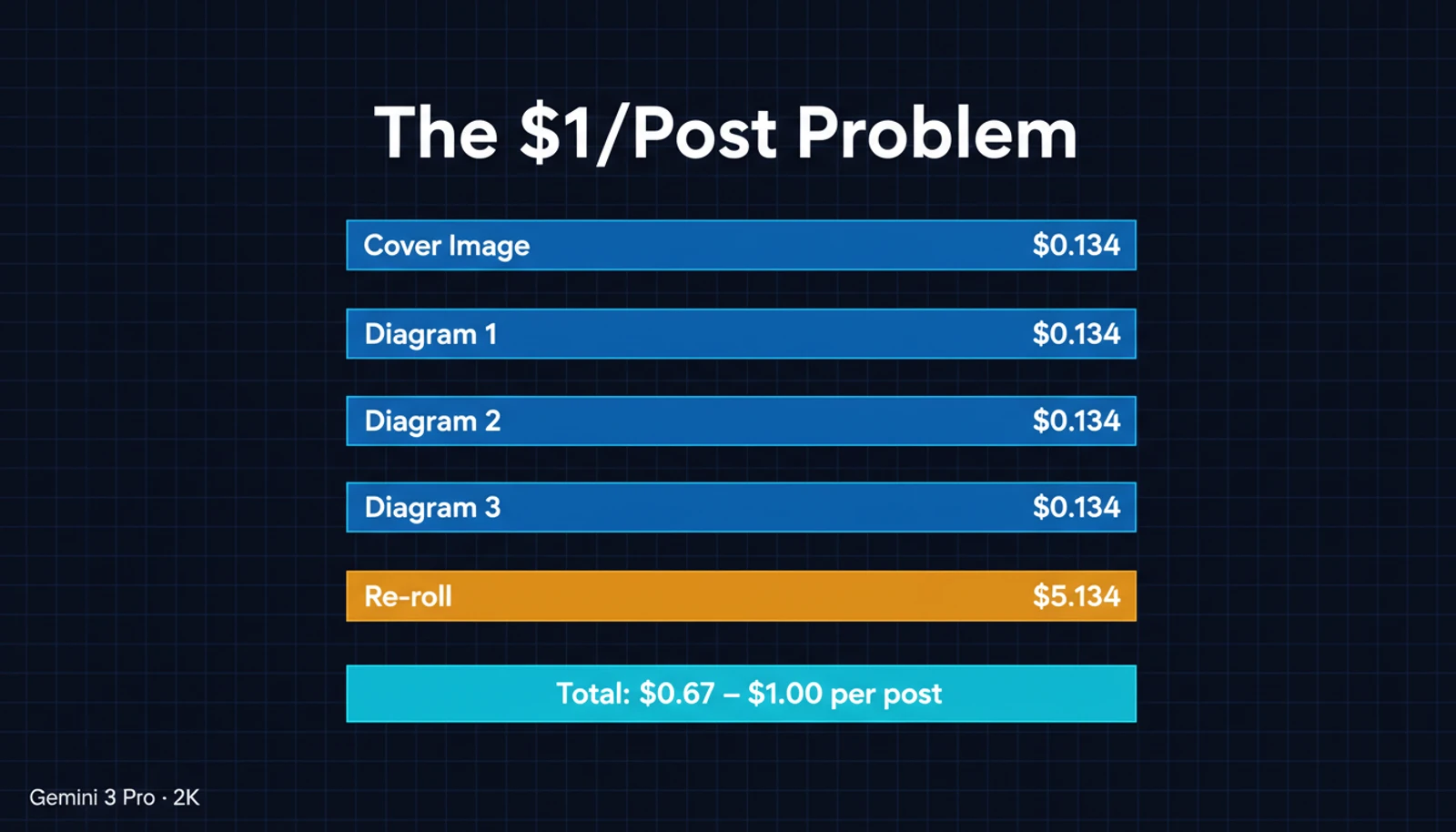
Let me break down what a typical blog post costs in image generation:
| Image | Purpose | Resolution | Cost |
|---|---|---|---|
| Cover image | Social sharing, hero banner | 2K | $0.134 |
| 3-4 article diagrams | Technical illustrations with text | 2K | $0.134 each |
| 1-2 re-rolls | When a generation misses the mark | 2K | $0.134 each |
| Total | $0.67 - $1.00 |
That's $0.67 to $1.00 per post, using a single provider at a single quality tier for everything. The architect in me recognized this immediately: I was using a premium tool for every job, regardless of whether the job needed it.
Questioning Assumptions
Before jumping to alternatives, I needed to understand what I was actually paying for. Three questions:
1. Could Google AI Pro subscription ($19.99/month) help?
Google's consumer subscription gives you generous image generation in the Gemini app — up to 1,000 images per day via the consumer interface. But here's the catch that isn't obvious: the subscription does not provide API access for image generation. Consumer app and developer API are separate billing worlds. The $10/month Google Cloud credit it includes would offset maybe 75 API calls. Not a solution.
2. Could GitHub Copilot Enterprise generate images?
No. Copilot can analyze images — feed it a screenshot and it'll write code from it. But it cannot generate new images. This was a dead end.
3. Is Gemini 2.5 Flash Image free on the API?
This one had conflicting information online. Some guides claimed 1,500 free images per day. The reality, confirmed by a Google community moderator: Gemini 2.5 Flash Image Preview was briefly available during a promotional period, but there is no permanent free tier for image generation on the Gemini API. As a Paid Tier 1 user, every API call costs money.
Three assumptions, three dead ends. Time for a different approach.
The Key Insight: Not All Images Need the Same Engine
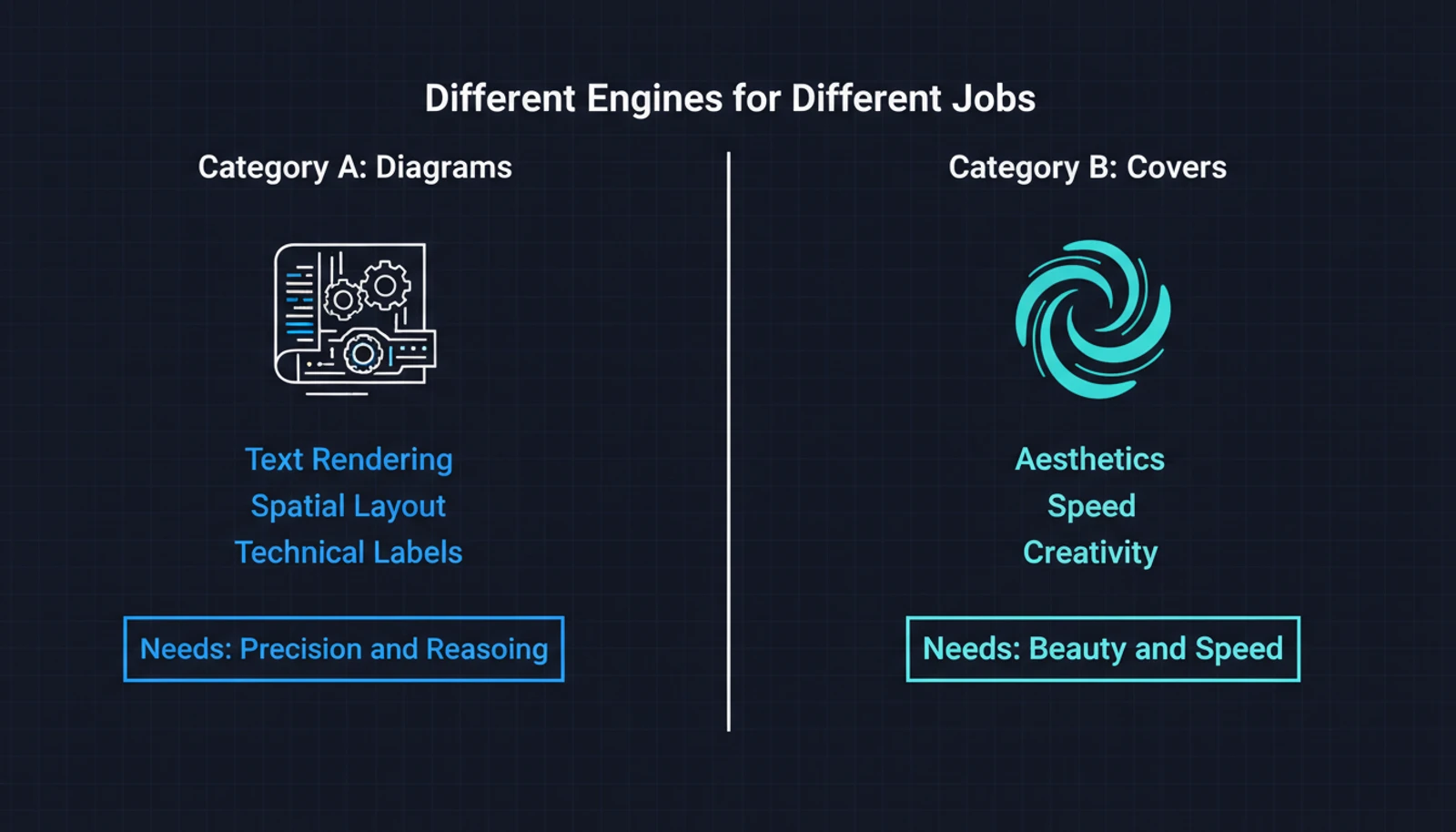
I went back to my blog and actually looked at what I was generating. The images fell into two clear categories:
Category A — Diagrams with text and labels. Architecture overviews, framework comparisons, process flows with multiple text annotations. These need precise text rendering, clean layouts, and a model that "reasons" about spatial arrangement.
Category B — Atmospheric covers. Abstract visuals, mood pieces, conceptual art. A brain with circuit traces, a watercolor sunset, a dark-mode network visualization. No text. No labels. Pure aesthetics.
I was paying $0.134 per image for both categories. But Category B doesn't need a model that excels at text rendering. It needs a model that's fast, good at aesthetics, and cheap.
The Contenders
Once you start looking beyond Google's garden, the pricing landscape shifts dramatically:
| Provider | Model | Cost/Image | Text Quality | Speed |
|---|---|---|---|---|
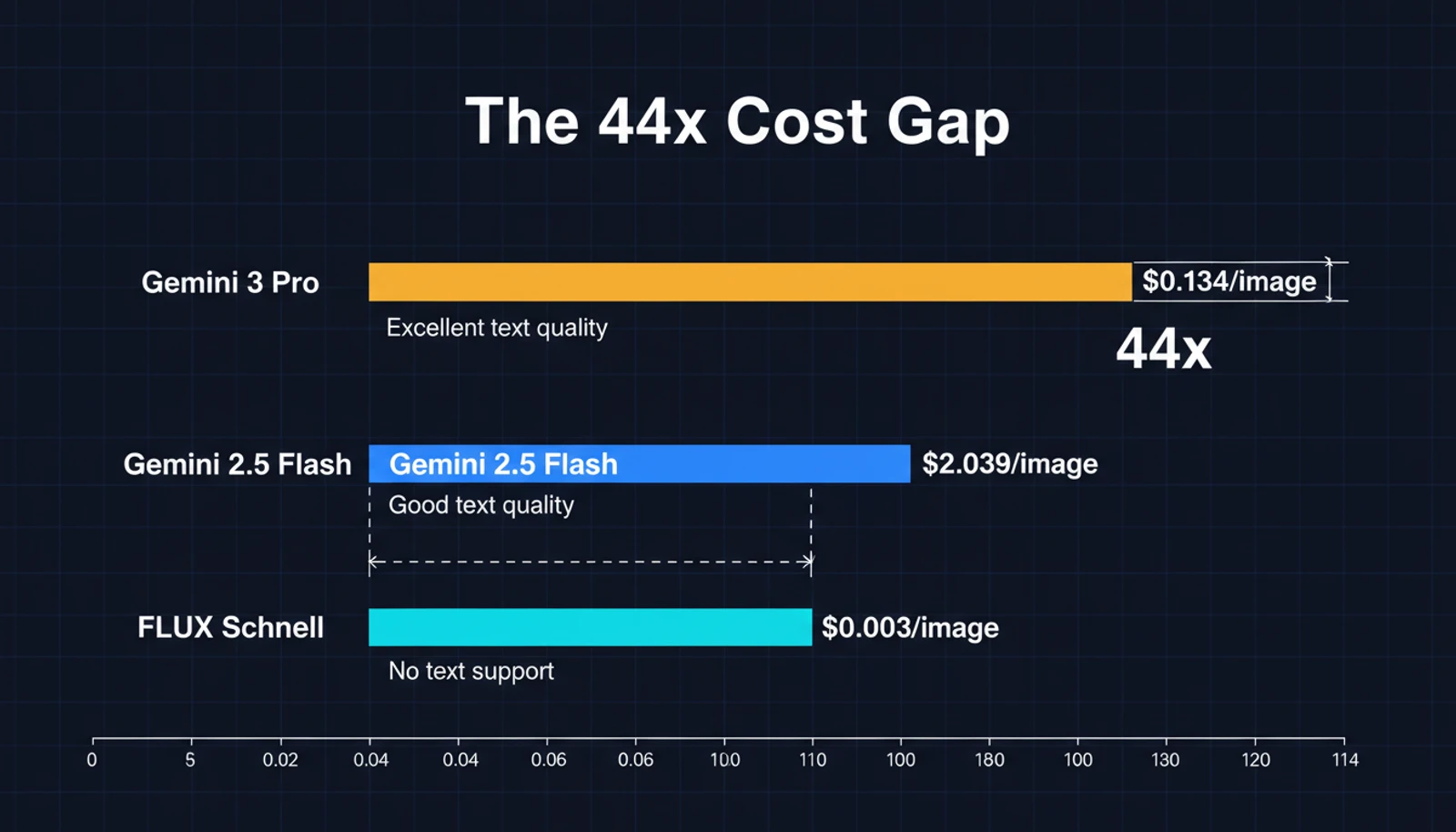
| Gemini 3 Pro Image | $0.134 (2K) | Excellent | ~10s | |
| Gemini 2.5 Flash Image | $0.039 (1K) | Good | ~2s | |
| Replicate | FLUX Schnell | $0.003 | Poor for multi-label | ~2s |
| Replicate | SDXL Lightning | $0.002 | Poor | ~1s |
The gap between $0.134 and $0.003 is not a rounding error. That's a 44x difference.
But FLUX Schnell can't do what Gemini does with text. I tested it — ask FLUX to generate a diagram with five labeled sections and technical terms like "Data Governance" or "Workflow Optimization," and you'll get garbled letters, misplaced labels, or creative reinterpretations of English. It's a diffusion model. It doesn't reason about text.
For atmospheric covers though? FLUX is excellent. Fast, creative, and at $0.003 per image, practically free.
The Two-Tier Solution
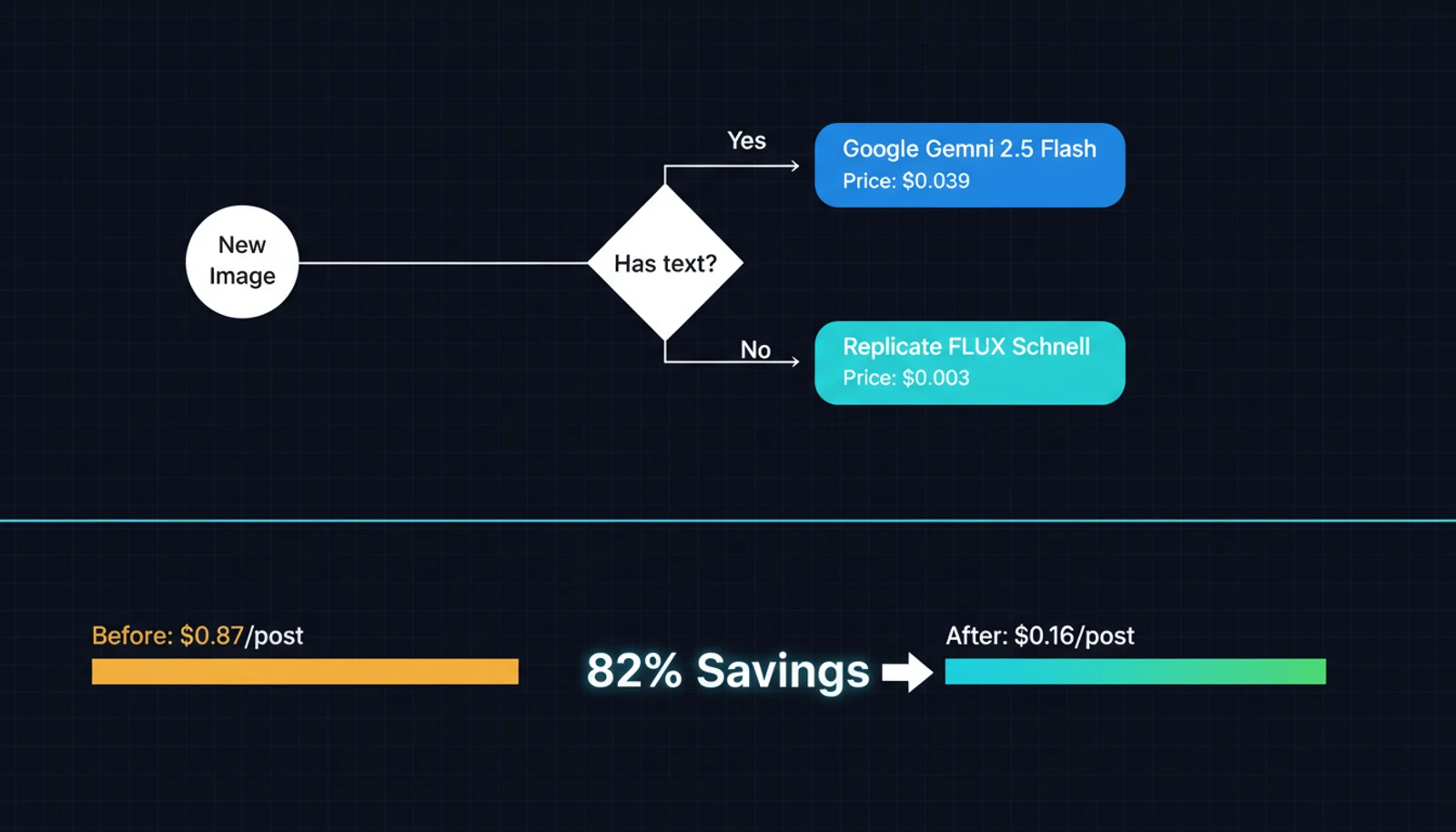
The answer was obvious once the categories were clear: use the right engine for the right job.
| Image Type | Provider | Model | Cost |
|---|---|---|---|
| Diagrams, infographics, text-heavy | Gemini 2.5 Flash Image | $0.039 | |
| Covers, abstract, atmospheric | Replicate | FLUX Schnell | $0.003 |
| Premium 4K (rare) | Gemini 3 Pro Image | $0.24 |
In my image generation skill, this translates to a simple flag:
# Diagram with text labels → Google (default)
npx -y bun image-gen/scripts/main.ts \
  --prompt "Architecture diagram showing..." \
  --image diagram.png --quality 2k

# Artistic cover → Replicate (13x cheaper)
npx -y bun image-gen/scripts/main.ts \
  --prompt "Abstract watercolor of..." \
  --image cover.webp --provider replicate
The implementation was straightforward. I added Replicate as a fourth provider alongside Google, OpenAI, and DashScope. The Replicate provider calls the FLUX Schnell API with sync mode, maps aspect ratios to FLUX's supported set, and auto-detects output format from the file extension. About 120 lines of TypeScript.
I also changed the Google default from Gemini 3 Pro to Gemini 2.5 Flash — same quality tier for text rendering at 1K resolution, but $0.039 instead of $0.134 per image. For blog images that end up as compressed WebP files at 1200px wide, 1K source resolution is more than enough.
The New Math
Same blog post, same images, new approach:
| Image | Provider | Cost |
|---|---|---|
| Cover image (no text) | Replicate FLUX | $0.003 |
| 3 article diagrams (with text) | Google 2.5 Flash 1K | $0.117 |
| 1 re-roll (diagram) | Google 2.5 Flash 1K | $0.039 |
| Total | $0.159 |
Down from ~$0.87 to ~$0.16. That's an 82% reduction on a typical post. And if the cover had needed text? $0.039 instead of $0.003 — still massively cheaper than the old setup.
For posts that are mostly atmospheric with fewer diagrams, the savings go even further. A photo-essay style post with one cover and two scene images through Replicate: $0.009 total.
What I Learned
The premium model isn't always the right model. Gemini 3 Pro Image is genuinely impressive — its text rendering and 4K output are best-in-class. But for a blog that serves compressed WebP images, I was paying for capabilities I wasn't using.
Resolution matters less than you think for web. My blog images display at roughly 800-1200px wide. Generating at 2K or 4K and then compressing to WebP at 1200px is like filming in 8K for a YouTube short. The 1K tier at $0.039 produces visually identical results after compression.
Text rendering is the real differentiator. Every AI image generator can make a beautiful sunset. Very few can spell "Workflow Optimization" correctly inside a diagram with five labeled sections. This is where the pricing gap is justified.
Free tiers are unreliable. Multiple sources claimed Gemini 2.5 Flash had 1,500 free images per day. It was a temporary promotion. If your workflow depends on free tier limits, have a fallback plan.
The Setup
If you want to try this yourself, the core pieces are:
- A Google API key (Paid Tier 1) for Gemini 2.5 Flash Image — good text rendering at $0.039/image
- A Replicate API token for FLUX Schnell — fast aesthetics at $0.003/image
- Logic to route text-heavy prompts to Google and aesthetic prompts to Replicate
The decision of which provider to use can be automated or manual. For my workflow, I keep it manual — a --provider replicate flag when I know the image is purely visual. The mental overhead of choosing is zero: if the image needs readable text, use Google. Otherwise, Replicate.
Looking Ahead
The AI image generation market is moving fast. Google's Imagen 4 models are already at $0.02 per image. FLUX 2 is pushing quality boundaries on the open-source side. Together AI was offering FLUX Schnell for free during a promotional period. Prices will continue to drop.
But the principle will stay the same: match the tool to the task. A two-tier approach today might become a three-tier approach tomorrow — perhaps with a local model for drafts, a cheap API for covers, and a premium API for text-heavy diagrams.
The best optimization isn't finding the cheapest model. It's understanding which images actually need expensive models and which don't.